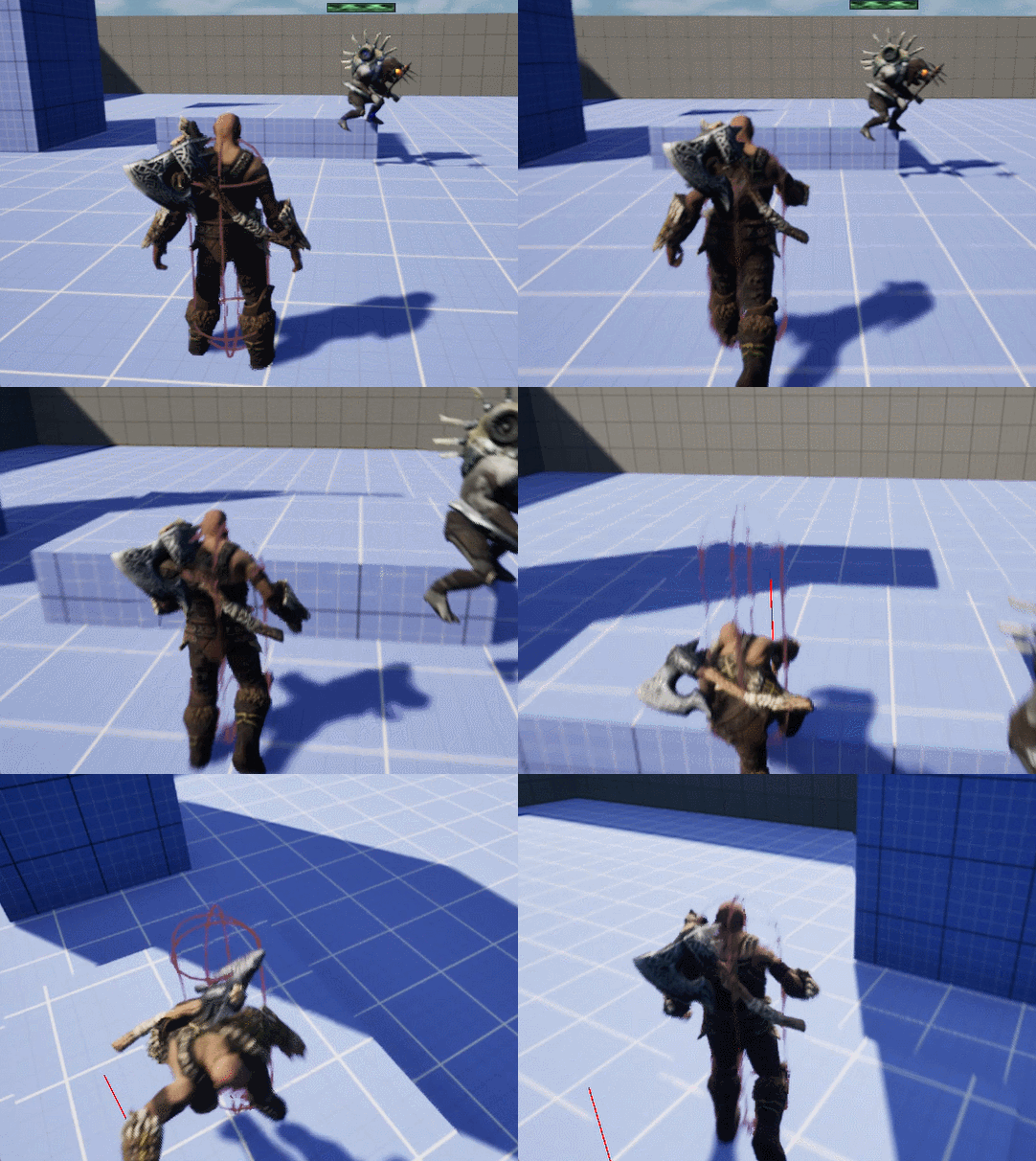
클라이밍 시스템을 만들면서, 뛰어넘기, 턱 내려가기, 턱에 도착하기라는 클라이밍을 할 때 주요 조건 검사에 대해서 정리한다.
1. Vaulting 검사하기
※ 게임에서 '볼팅(Vaulting)'은 주로 파쿠르(Parkour) 요소의 하나로, 장애물을 뛰어넘거나(점프), 넘는 동작을 의미하며, 특정 게임 장르(퍼즐, 액션, RPG)나 게임 엔진(언리얼 엔진)의 개발 기술 용어로도 사용된다.

const FVector ComponentLocation = UpdatedComponent->GetComponentLocation();
const FVector ComponentForward = UpdatedComponent->GetForwardVector();
const FVector UpVector = UpdatedComponent->GetUpVector();
const FVector DownVector = -UpdatedComponent->GetUpVector();

for (int32 i = 0; i < 5; i++)
{
	const FVector Start = ComponentLocation + UpVector * 100.f +
		ComponentForward * 100.f * (i + 1);

	const FVector End = Start + DownVector * 100.f * (i + 1);

	FHitResult VaultTraceHit = DoLineTraceSingleByObject(Start, End);

if (i == 0 && VaultTraceHit.bBlockingHit)
	{
		OutVaultStartPosition = VaultTraceHit.ImpactPoint;
	}

	if (i == 3 && VaultTraceHit.bBlockingHit)
	{
		OutVaultLandPosition = VaultTraceHit.ImpactPoint;
	}
}
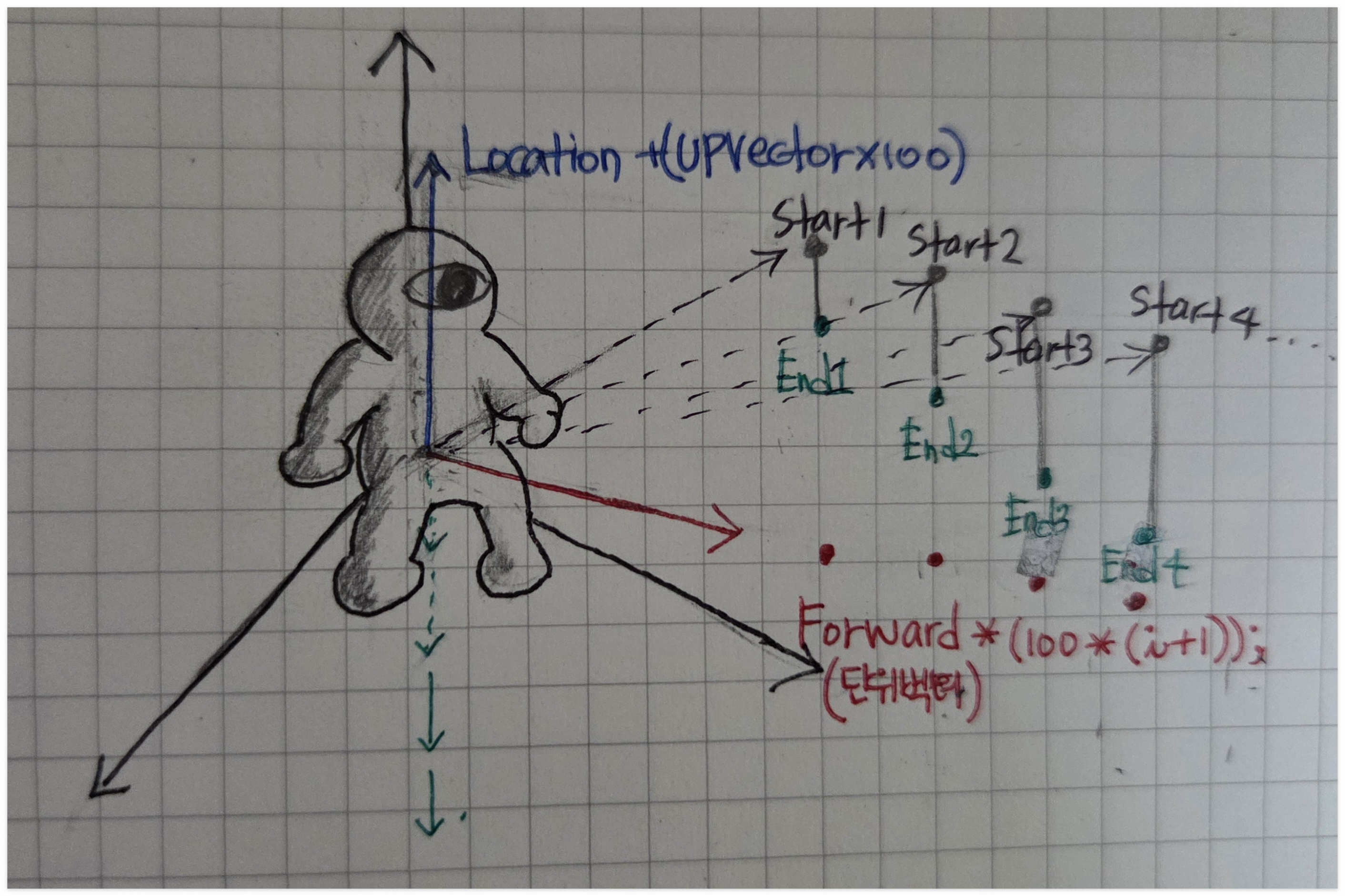
const FVector Start = ComponentLocation + UpVector * 100.f +
ComponentForward * 100.f * (i + 1);
(1). ComponentLocation = UpdatedComponent->GetComponentLocation()으로 점!, 절대 좌표이다. 단위벡터가 아니다.
(2). Upvector (길이가 1인 방향벡터 : 단위벡터 O)
(3). UpVector * 100.f + ComponentForward * 100.f = ComponentLocation에 방향 벡터를 일정 크기만큼 늘리고 더해 만든 벡터
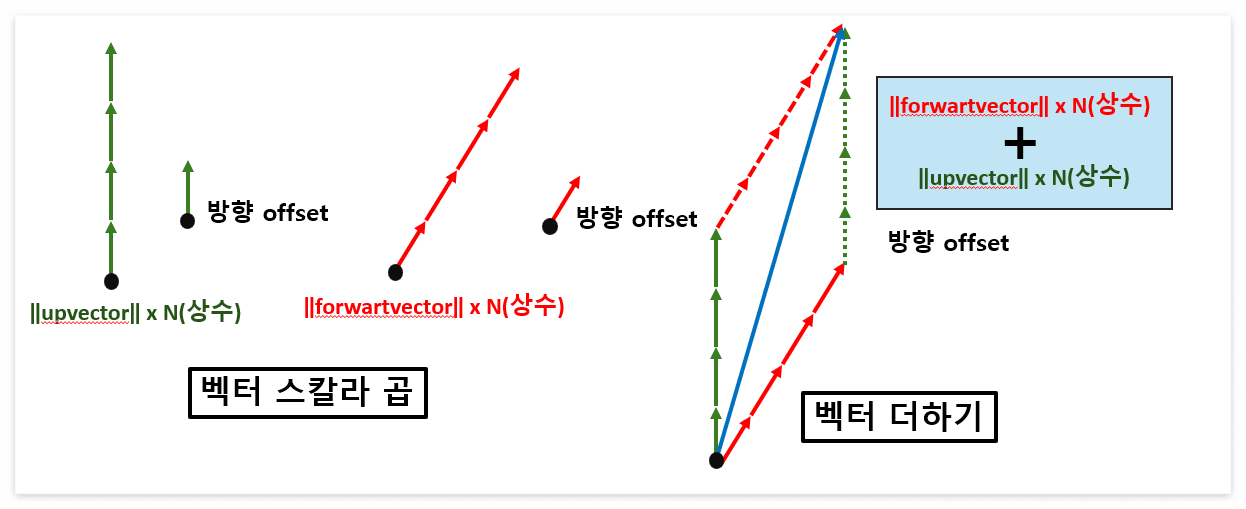
(4) 그렇게 나온 벡터에 ComponentLocation 절대 좌표를 더해준다고 생각하면 그 벡터가 Start 점이 된다.

(5) 이와 같은 방법으로 end 점을 구해서 언리얼 함수 DoLineTraceSingleByObject로 라인 오브젝트를 만들어 여러 개의 Line이 staticobject들과 충돌하는 여부를 검사하여 Vaulting이 가능한 조건을 검사한다.
2. ClimbDownLedge 검사하기

const FVector ComponentLocation = UpdatedComponent->GetComponentLocation();
const FVector ComponentForward = UpdatedComponent->GetForwardVector();
const FVector DownVector = -UpdatedComponent->GetUpVector();

const FVector WalkableSurfaceTraceStart = ComponentLocation + ComponentForward * ClimbDownWalkableSurfaceTraceOffset;
const FVector WalkableSurfaceTraceEnd = WalkableSurfaceTraceStart + DownVector * 100.f;

FHitResult WalkableSurfaceHit = DoLineTraceSingleByObject(WalkableSurfaceTraceStart, WalkableSurfaceTraceEnd, true);

const FVector LedgeTraceStart = WalkableSurfaceHit.TraceStart + ComponentForward * ClimbDownLedgeTraceOffset;
const FVector LedgeTraceEnd = LedgeTraceStart + DownVector * 300.f;

FHitResult LedgeTraceHit = DoLineTraceSingleByObject(LedgeTraceStart, LedgeTraceEnd, true);

if (WalkableSurfaceHit.bBlockingHit && !LedgeTraceHit.bBlockingHit)
{
	return true;
}

return false;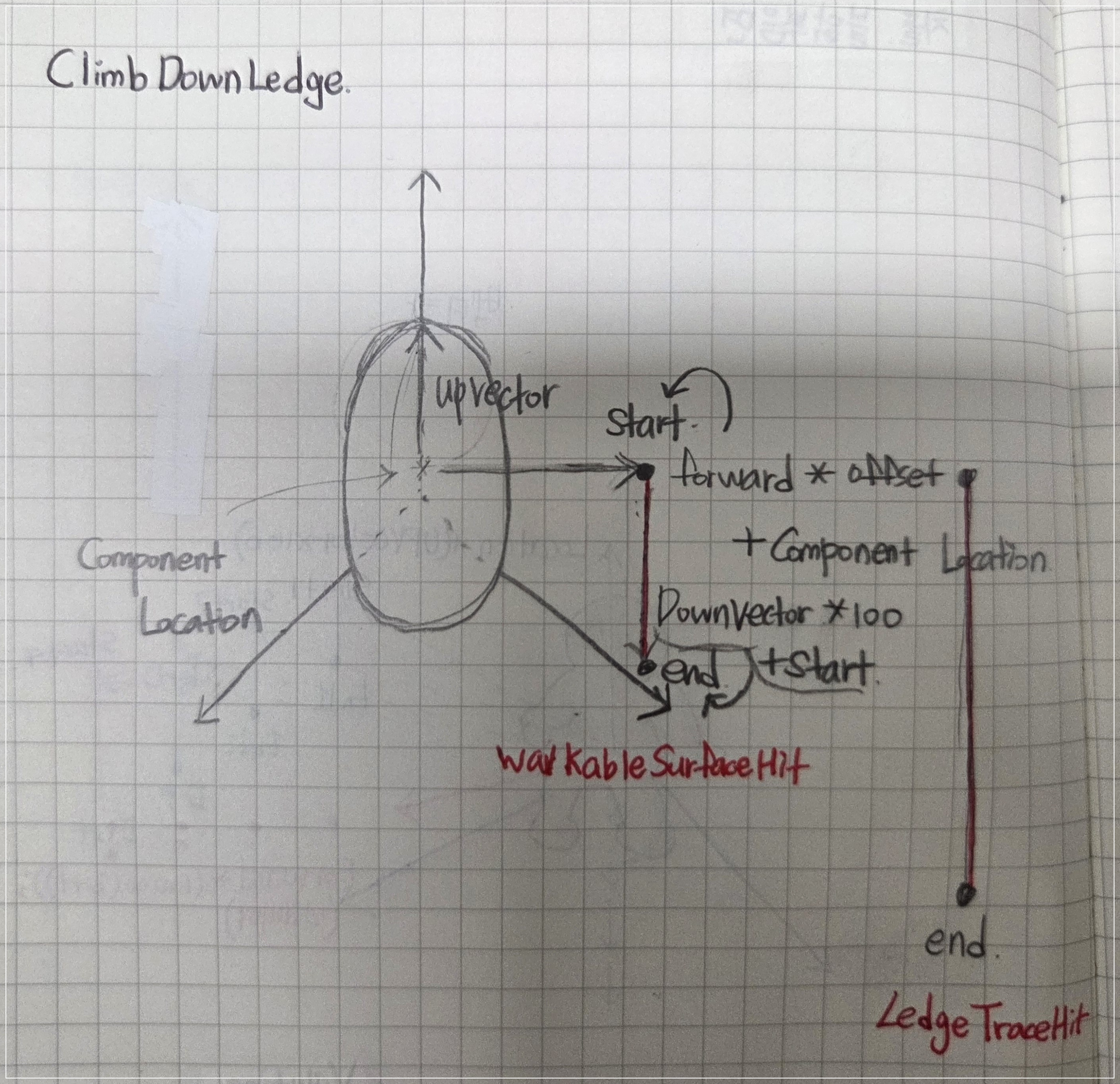
(1). WalkableSufaceHit와 LedgeTraceHit를 만들었는데 플레이어 기준 내려가기 전 서 있어야 하는 공간이 있는지 안전하게 서있는 면이 있는지 확인하기 위한 LineObject가 WalkableSufaceHit 이고, LedgeTraceHit LineObject는 땅이 아닌지 확인하는 변수로 작용한다.
if (WalkableSurfaceHit.bBlockingHit && !LedgeTraceHit.bBlockingHit)그러므로 15번줄 코드 의미는 바닥이 있고, 좀 더 먼 곳에 바닥이 없다면 캐릭터는 내려갈 수 있는 조건이 된다.
3. ReachedLedge 검사하기

FHitResult EyeHitResult = TraceFromEyeHeight(100.f, 20.f, true );

if (!EyeHitResult.bBlockingHit)
{
	const FVector WalkableSurfaceTraceStart = EyeHitResult.TraceEnd;

	const FVector DownVector = -UpdatedComponent->GetUpVector();
	const FVector End = WalkableSurfaceTraceStart  + DownVector * 100.f; // 추척 오프셋

	FHitResult aHitResult = DoLineTraceSingleByObject(WalkableSurfaceTraceStart, End , true ,true);

	if (aHitResult.bBlockingHit && GetUnrotatedClimbVelocity().Z > 10.f)
	{
		return true;
	}
}

return false;
(1) TraceFromEyeHeight(float TraceDistance, float TraceStartOffset, bool bShowDebugShape , bool bDrawPersistantShapes) 3번째 줄 함수는 아래 함수로 ComponentLocation 기준 Upvector 방향 (BaseEyeHeight+TraceStartOffset = 20)에 있는 점(Start)에서부터 ForwardVector방향 100 떨어진 점(end)이 히트가 되지 않는다면, 이제 더 이상 올라갈 벽이 없다는 의미이다.
const FVector ComponentLocation = UpdatedComponent->GetComponentLocation();
const FVector EyeHeightOffset = UpdatedComponent->GetUpVector() * (CharacterOwner->BaseEyeHeight + TraceStartOffset);

const FVector Start = ComponentLocation + EyeHeightOffset;
const FVector End = Start + UpdatedComponent->GetForwardVector() * TraceDistance;

return DoLineTraceSingleByObject(Start, End, bShowDebugShape, bDrawPersistantShapes);
(2) if문 안에 있는 코드는 (1)번 조건 검사로 더 이상 올라갈 벽이 없을 때, LineObject의 끝점을 DownVector 방향으로 일정거리를 내려 올라갈 수 있는 땅이 있는지 확인하는 코드이다.
출처
🔹그림 : 모두 직접제작
🔹강의: udemy -> Unreal Engine 5에서 C++를 사용하여 Movement Component, Control Rig 및 Motion Warping을 통한 클라이밍 시스템 구축하기
'🎯 game engine > ◽ 언리얼(unreal)' 카테고리의 다른 글
| [Unreal] Behavior Tree 이해하면서 몬스터 AI 만들기 (0) | 2025.12.02 |
|---|---|
| [Unreal / C++] AAA Frontend UI/Menu 만들기 (프레임 워크 정리 + 델리게이트, 서브시스템) (1) | 2025.11.20 |
| [Unreal] UI 세팅/구조 분석 (Set Up Common UI) (7) | 2025.09.16 |
| [Unreal] Frontend UI Subsystem (2) | 2025.09.14 |
| cast와 castcheck 차이 (0) | 2025.09.14 |